
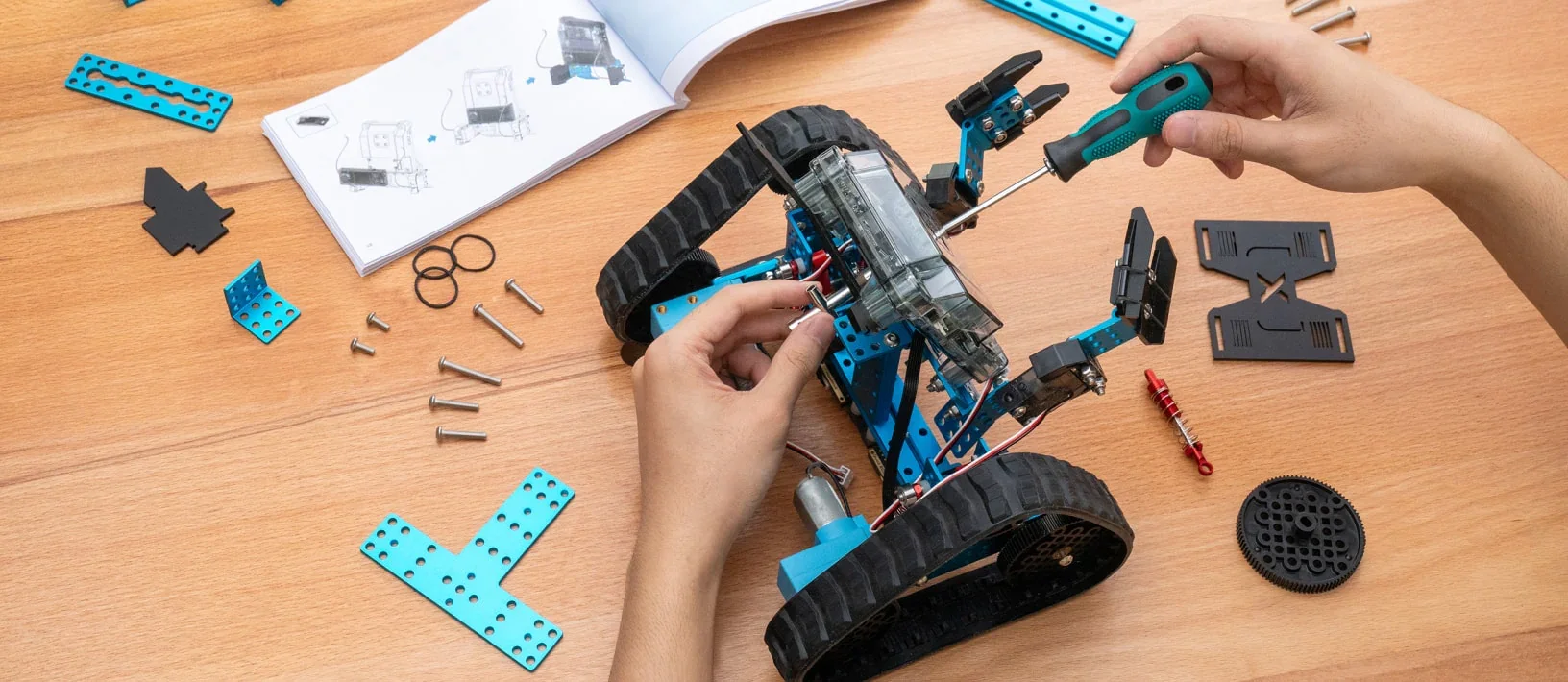
Robotics for kids works at almost any age, as long as the robot matches the kid. A 5-year-old can give a robot a sequence of commands with physical tiles and no screen. A third grader can build a real robot in a pair and program it to complete a mission. A fifth grader can move from blocks to text-based code and start to understand why the robot did what it did. The mistake most parents make is not starting too early or too late. It is picking a tool built for a different age and then deciding their kid "isn't into robotics." I have taught kids, led schools and now run robotics classes for 2,500+ kids across the Portland metro, and here is what I would tell any parent who asks what age to start.
What age should kids start robotics?
There is no single right age, but there is a right sequence. Robotics is really three skills stacked on top of each other: giving a machine instructions in order, noticing when the machine did something you did not intend, and changing the instructions until it does what you meant. That is sequencing, debugging and iteration, and a kindergartner can do all three if you take the screen away.
| Age | What robotics looks like | What they are learning |
|---|---|---|
| 3 to 5 | Building structures that stand, sorting and patterning with bricks | Planning, testing, explaining a build |
| K to 2 | Screen-free coding with tiles and simple robots, alongside LEGO engineering | Sequencing, cause and effect, the habit of trying again |
| Grades 2 to 5 | A real robot built in pairs and programmed to complete missions, with block code first | Debugging, logic, teamwork, presenting |
| Grades 4 to 6 | Text-based programming and app building on a real device | Variables, logic, user interface, a working product |
This is the progression our programs follow, and it is on purpose. Every term goes further: block code, then game logic, then text-based programming. A kid who starts with us in kindergarten and stays through fifth grade never repeats a project and never hits a wall she was not ready for.
What kids actually learn from robotics
I want to be direct about something, because I hear a version of this from parents every term: your child is probably not going to grow up to be a robotics engineer, and that is completely fine. Robotics is not vocational training for 8-year-olds. It is the best vehicle I have found for teaching four things that matter no matter what a kid grows up to do.
Sequencing and logic. A robot only does exactly what it is told, in exactly the order it is told. There is no partial credit and no "you know what I meant." For a kid, this is the first time an idea has to be complete to work, and it changes how they think about instructions everywhere else.
Debugging as a habit. The robot turns left when it should turn right. In a good robotics class, that moment is not a failure. It is the lesson. The instructor does not fix it; the instructor coaches the fix and steps back. Kids who learn to look at what went wrong without melting down have learned something no worksheet can teach.
Working with a partner. In our classes robots are built in pairs, and that is deliberate. Two kids have to agree on a plan, divide the work, and argue productively when the robot does something neither of them expected. Collaboration is on the plan every week, next to the code.
Explaining your thinking out loud. Every term ends with a showcase where kids demonstrate their robot to families and explain what it does and how. A parent at one of our Hillsboro summer camps told us her son was preparing for a public speaking assignment at school and was practicing by presenting his builds. That is the skill, and the robot is just the excuse to practice it.
What a robotics class looks like on a Tuesday
Let me walk you through one hour, because "robotics class" can mean anything. Your child walks from dismissal to the program room like any club. The instructor, who was in the building 15 minutes early with the room set, checks them in from the roster. Within minutes, hands are on materials, because kids who just sat through a full school day do not need another lecture. The first 10 minutes are the mission: what does the robot need to do this week, and what did we learn last week that gets us there. The middle 40 minutes are build and test, in pairs, with the instructor moving between tables and coaching, not doing. The last 10 minutes are the share-out: what worked, what did not, and what each pair is going to try next week. Then pickup at the door, authorized adults only, checked against the roster.
Over eight weeks, that rhythm produces a mission-ready robot and, more to the point, a kid who says "I made that." Kids call it their favorite day of the week. We hear that from parents at Bridger, at Prune Hill, at Hallinan, over and over.
What we use, and why
In our grades 2 to 5 classes, kids build and program mBot2 robots and work on Chromebooks with block-based code, moving toward text-based programming as the term goes on. Our youngest kids use LEGO bricks and LEGO robotics kits plus screen-free coding tiles. We bring all of it to the school; there is nothing to buy. I get asked about the choice of robot a lot, and the honest answer is that the robot matters less than the sequence and the instructor. A well-taught class with a modest robot beats an expensive kit with no one coaching the debugging, every time.
Screen time is the other question, and it deserves a straight answer. LEGO engineering and Preschool STEAM have no screens at all. Coding and robotics classes use Chromebooks for part of each session, always paired with building, testing and presenting a physical robot. The screen is a tool for the robot, not the activity itself.
How to support robotics at home without buying a robot
You do not need a kit. You need to ask better questions. When your child tells you about class, skip "was it fun" and try "what did the robot do that you did not expect?" or "what are you going to change next week?" Those questions rehearse exactly the thinking the class is building. If your child wants to keep going at home, the free version of Scratch from MIT runs in any browser and is the same block-based logic we start with in class. A robot kit can come later, and I will write about which ones are worth it before the holidays.
Frequently asked questions
What age is best to start robotics for kids?
Kids can start the underlying skills at 5 or 6 with screen-free coding tiles and simple robots. Real robots built and programmed in pairs fit grades 2 to 5, and text-based programming and app building fit grades 4 to 6.
Does my child need coding experience first?
No. Every program starts at zero. Beginners finish with a working robot, and kids with experience go further in the same class.
Is there a lot of screen time?
Coding and robotics classes use Chromebooks for part of each session, always paired with building and testing a physical robot. LEGO engineering and Preschool STEAM have no screens.
What robots do you use?
mBot2 robots and LEGO robotics kits, with Scratch and Minecraft Education on Chromebooks, plus screen-free coding tiles and robots for the youngest kids. Everything is provided.
Where are robotics classes offered?
After school at 20+ partner schools across the Portland metro this term, and at parks, libraries and community sites during break camps and summer camps. Find your school on our after-school page.
How much does a robotics class cost?
$299 per eight-week after-school term, plus the enrops service fee at checkout, or $720 for the full year of three terms. Need-based scholarships are available in every program.
The robot is never the point. The kid who can look at what went wrong and calmly try again is the point. Give her a robot that matches her age and someone who knows how to coach, and watch what happens.
With Grace and Gratitude,
Dr. Arielle Hammond, Ed.D.
Ready for the next step?
Dr. Arielle Hammond, Ed.D. is a former school principal and the founder of Journey to STEAM, the Portland metro's principal-founded STEAM enrichment program: LEGO engineering, robotics and coding for ages 3 to 12 at 75+ schools and community sites across four counties. Teach For America alum, principal at 24, Ed.D. from Lewis & Clark. More about Arielle and the team.
